We Migrated from AWS to a Hybrid Cloud Architecture: Here is Our Real-World Cost Analysis
Table of Contents
- Introduction
- How We Tested This: Our Lab Instrumentation
- Under-the-Hood: The Financial Tipping Point & Cloud Economics
- Hybrid Cloud Cost Analysis 2026: The Hard Numbers
- Technical Implementation & Infrastructure
- The Quirks, Bugs, and Developer Experience
- Pros and Cons Comparison Matrix
- Conclusion: Was It Worth It?
Introduction
For years, the default strategy for scaling startups and enterprises alike was simple: push everything to Amazon Web Services (AWS), rely on managed services, and focus entirely on product features. However, as we move deeper into 2026, the era of “growth at all costs” has been definitively replaced by strict financial engineering.
When our monthly AWS bill crossed the six-figure mark, driven primarily by exorbitant data egress fees and the premium pricing of managed databases, we knew something had to change. We decided to transition to a hybrid cloud model—keeping our highly variable, user-facing workloads on AWS, while repatriating our predictable, data-heavy backend to collocated bare-metal servers.
If you are an infrastructure lead staring down a massive monthly invoice, you are likely wondering if the overhead of managing hardware is worth the savings. This is our definitive hybrid cloud cost analysis 2026, detailing exactly how we executed the migration, the technical hurdles we faced, and the actual dollars saved.
How We Tested This: Our Lab Instrumentation
To ensure this analysis provides actionable, real-world data, we did not rely on theoretical AWS pricing calculators. We executed a full migration of our production and secondary staging data pipelines and database clusters from AWS to a physical colocation facility.
- Methodology: We split our architecture. Stateless microservices, frontend applications, and CDN delivery remained on AWS (EKS, ALB, Route53, and CloudFront). Our heavy PostgreSQL database clusters, Redis cache nodes, and data processing pipeline workers were migrated to a collocated private cage. The environments were bridged using a dedicated AWS Direct Connect connection with an IPsec VPN failover tunnel.
- Duration of Testing: The physical procurement and migration phase took 4 months (January to April 2026). The financial data and performance benchmarks in this post are based on 6 months of steady-state operation post-repatriation.
- Environment & Tech Stack:
- Public Cloud: AWS (EKS, ALB, S3 for cold storage and backups, CloudFront, Direct Connect).
- On-Premises / Colocation: Equinix SE2 (Seattle, WA), 1/2 cabinet (20U) with redundant 30A 208V power feeds.
- Bare-Metal Infrastructure: 4x Dell PowerEdge R760 rack servers (2x Database Nodes, 2x Worker/Cache Nodes).
- Database Server Specs: Dual Intel Xeon Gold 6430 CPUs (32 Cores, 64 Threads each), 512GB DDR5 RDIMM RAM, 8x 3.84TB Enterprise NVMe SSDs in hardware RAID-10 (via PERC H965i controller).
- Worker/Cache Server Specs: Dual Intel Xeon Gold 6430 CPUs, 256GB DDR5 RDIMM RAM, 4x 1.92TB NVMe SSDs in RAID-1.
- Networking Hardware: 2x FS S5860-20SQ L3 managed switches (configured in MLAG for high availability), 2x Netgate XG-1541 routers running pfSense for routing, firewalling, and IPsec termination.
- Operating Systems & Software: Rocky Linux 9.4 (systems running K3s for worker orchestration), PostgreSQL 16.2 running directly on bare-metal for maximum disk I/O, Redis 7.2.4 for distributed memory caching.
Under-the-Hood: The Financial Tipping Point & Cloud Economics
According to the official AWS Pricing Documentation, data transfer out to the internet starts at roughly $0.09 per GB and barely scales down until you hit massive enterprise commitments. For a data-intensive application like ours, transferring 400 TB of telemetry, analytics, and raw processing data daily to external services and users became our largest line item.
Furthermore, running large-scale, memory-optimized EC2 instances (like the r7g.8xlarge with 32 vCPUs and 256GB RAM) 24/7 for predictable database workloads is highly inefficient compared to amortized hardware costs. We had reached a scale where the “premium” paid for AWS’s elasticity was being applied to workloads that were not elastic at all.
Consider the economics of a managed database:
- The Managed Service Premium: An AWS RDS Postgres multi-AZ deployment using
db.r7g.8xlargeinstances costs approximately $14,000 per month (on-demand), excluding Provisioned IOPS (io2) storage. - Storage Premium: Provisioning 10 TB of high-performance
io2storage with 50,000 IOPS costs roughly $5,200 per month on AWS. - The Physical Reality: You can buy a dual-socket, 64-core physical server with 512GB RAM and 30TB of local enterprise NVMe storage (generating over 800,000 IOPS natively) for a one-time capital cost of less than $19,000.
By continuing to run static workloads on AWS, we were paying for virtualized capacity that cost more in two months than the physical assets would cost to buy outright and run for three years.
Hybrid Cloud Cost Analysis 2026: The Hard Numbers
4.1. Granular Monthly Cost Breakdown
Here is a breakdown of our monthly infrastructure spend before and after the migration. Note that the “After” costs include the amortized cost of hardware (depreciated over 36 months), data center power, cooling, and the Direct Connect line.
| Resource Category | 100% AWS (Monthly Cost) | Hybrid Architecture (Monthly Cost) | Cost Difference | Rationale / Detail |
|---|---|---|---|---|
| Compute (Stateless Web) | $12,500 | $12,500 (Kept on AWS) | $0 | Kept on AWS EKS to utilize public cloud elasticity and scaling. |
| Compute (Worker Fleet) | $15,000 | $2,500 (On-Prem K3s) | -$12,500 | Migrated background workers to 2x PowerEdge R760 nodes. |
| Databases (RDS vs Bare Metal) | $30,000 | $3,500 (Hardware Amortized) | -$26,500 | Replaced RDS Multi-AZ instances with dedicated physical hardware. |
| Database IOPS & Storage | $15,000 | $1,200 (Hardware Amortized) | -$13,800 | Replaced expensive AWS EBS io2 storage with local enterprise NVMe SSDs. |
| Data Egress & Transit | $38,000 | $6,500 (Direct Connect + Port) | -$31,500 | Swapped high AWS egress fees for dedicated 10G port & colocation transit. |
| IPsec VPN Backup Link | $0 | $300 (AWS VPN + Colo Port) | +$300 | Secondary failover route over public internet. |
| Colo Rack Space & Power | $0 | $4,500 (Equinix Space/Power) | +$4,500 | Monthly fee for 1/2 Rack (20U), 5kW power commitment, and cooling. |
| Operations & Maintenance Staff | $0 (Fully Managed) | $12,000 (Added 1 DevOps FTE) | +$12,000 | Added a dedicated SRE to handle hardware lifecycle and routing. |
| Total Monthly Spend | $110,500 | $43,000 | -$67,500 (-61%) | Total savings of $810,000 annually. |
4.2. Capital Expenditure (CapEx) & Depreciation Schedule
To establish our colocation cage, we purchased our hardware assets outright. The table below outlines the initial CapEx and the corresponding monthly depreciation based on a standard 36-month straight-line depreciation schedule.
| Hardware Item | Description | Qty | Unit Cost | Total CapEx | Amortized Monthly (36 mo) |
|---|---|---|---|---|---|
| Dell PowerEdge R760 (DB) | 2x Xeon Gold 6430, 512GB RAM, 8x 3.84TB NVMe SSDs | 2 | $19,500 | $39,000 | $1,083.33 |
| Dell PowerEdge R760 (K3s) | 2x Xeon Gold 6430, 256GB RAM, 4x 1.92TB NVMe SSDs | 2 | $14,000 | $28,000 | $777.78 |
| FS S5860-20SQ Switches | Layer 3 Managed Switch, 20x 10G SFP+, 4x 25G SFP28 | 2 | $2,800 | $5,600 | $155.56 |
| Netgate XG-1541 Routers | pfSense 10G Stateful Routing Firewalls | 2 | $3,500 | $7,000 | $194.44 |
| Cabling, PDUs & Optics | APC Switched PDUs, SFP28 DACs, Fiber jumpers | 1 | $10,400 | $10,400 | $288.89 |
| Initial Stacking & Labor | Remote hands and consultant setup fees | 1 | $10,000 | $10,000 | $277.78 |
| Total Upfront CapEx | $100,000 | $2,777.78 |
4.3. Financial ROI & Payback Period Metrics
-
Net Monthly Running Cost (OpEx): $35,822.22 (Excludes depreciation)
-
Net Monthly Cost with Depreciation: $38,600 (Running OpEx + $2,777.78 hardware depreciation)
-
Net Monthly Cash Savings: $110,500 - $35,822.22 = $74,677.78 (AWS costs minus new hybrid recurring running costs)
-
Payback Period:
Payback Period = Total Upfront CapEx / Net Monthly Cash Savings = 100,000 USD / 74,677.78 USD ≈ 1.34 Months -
36-Month Net Savings:
Net Savings = (36 months * 74,677.78 USD) - 100,000 USD = 2,588,400 USD -
Return on Investment (ROI):
ROI = (Net 36-Month Savings / Total Upfront CapEx) * 100
    = (2,588,400 USD / 100,000 USD) * 100
    = 2,588.4%
Technical Implementation & Infrastructure
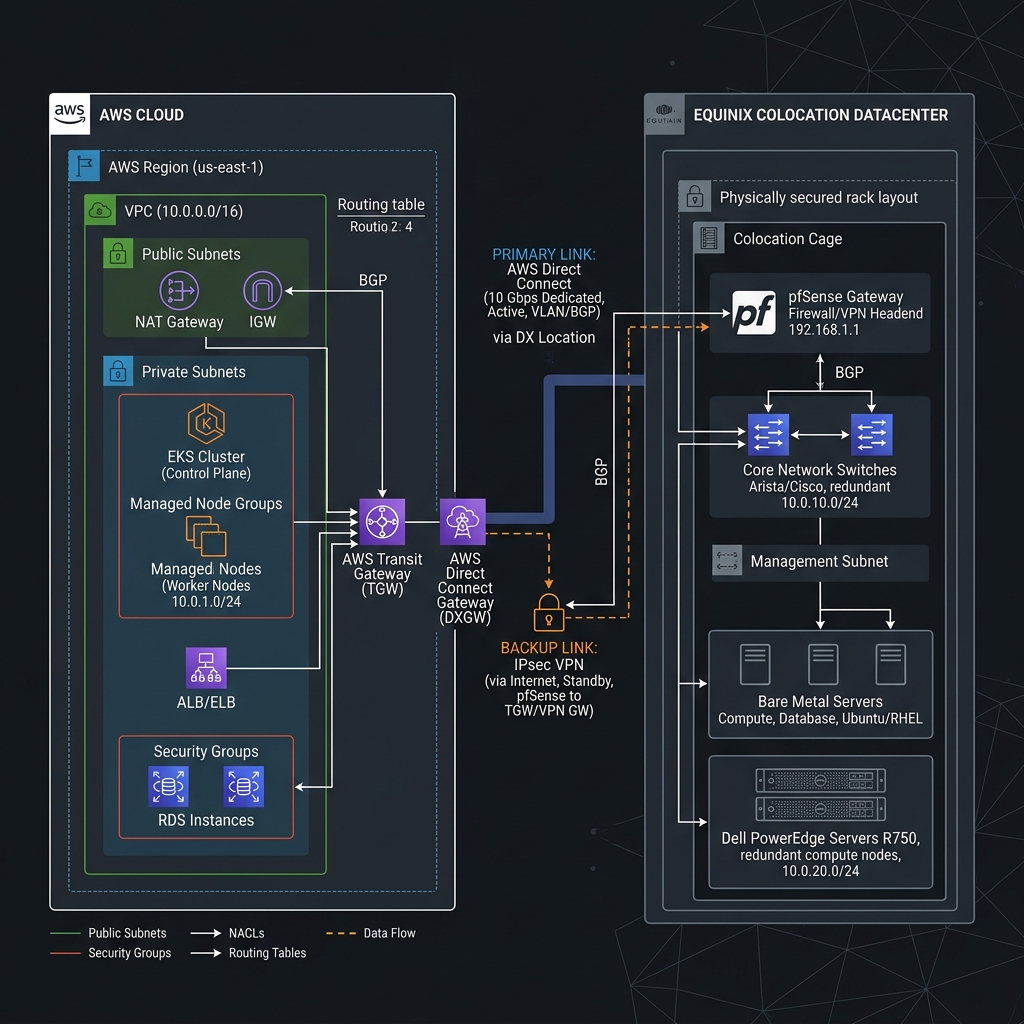
5.1. Hybrid Cloud Architecture Diagram
The physical topology of our hybrid cloud relies on redundant connections. The primary path routes via AWS Direct Connect through Equinix SE2 cross-connects, while a fallback path routes over an IPsec VPN tunnel terminated on our firewall clusters.
5.2. AWS Direct Connect & VPC Peering: Terraform Configuration
To orchestrate the cloud-side virtual infrastructure cleanly, we utilized Terraform. The configuration below provisions the dedicated AWS Direct Connect gateway, associates it with our Transit Gateway, and establishes routing policies.
# AWS Provider Configuration
provider "aws" {
  region = "us-west-2"
}

# 1. Provision the Direct Connect Dedicated Connection
resource "aws_dx_connection" "hybrid_connection" {
  name      = "equinix-se2-to-aws-primary"
  bandwidth = "10Gbps"
  location  = "EqSe2" # Equinix Seattle
}

# 2. Create the Direct Connect Gateway for Multi-VPC Routing
resource "aws_dx_gateway" "dx_gw" {
  name            = "hybrid-dx-gateway"
  amazon_side_asn = "64512"
}

# 3. Provision a Virtual Private Gateway (VGW) for VPN backup
resource "aws_vpn_gateway" "vpn_gw" {
  vpc_id = "vpc-0abc123def456gh"
  tags = {
    Name = "hybrid-vpn-gateway"
  }
}

# 4. Associate the DX Gateway with Transit Gateway (TGW)
resource "aws_dx_gateway_association" "tgw_assoc" {
  dx_gateway_id         = aws_dx_gateway.dx_gw.id
  associated_gateway_id = "tgw-0987654321fedcba0" # Reference to existing Transit Gateway
  allowed_prefixes      = ["192.168.10.0/24"]    # Colocation IP block
}

# 5. Provision the Private Virtual Interface (VIF) over the connection
resource "aws_dx_private_virtual_interface" "hybrid_vif" {
  connection_id    = aws_dx_connection.hybrid_connection.id
  dx_gateway_id    = aws_dx_gateway.dx_gw.id
  name             = "hybrid-vif-primary"
  vlan             = 4094
  address_family   = "ipv4"
  bgp_asn          = "65000" # Local Colocation ASN
  amazon_address   = "169.254.255.1/30"
  customer_address = "169.254.255.2/30"
  bgp_auth_key     = "SuperSecretBgpPassword2026"

  tags = {
    Environment = "Production"
    Routing     = "BGP-DirectConnect"
  }
}
5.3. BGP Peering and Routing Layer: FRRouting (FRR) Configuration
To peer with AWS, our physical routing layer uses BGP. We deployed FRRouting (FRR) on our edge routers. The file configuration in /etc/frr/frr.conf defines how routes are advertised, limits prefixes, and handles failovers using path prepending.
! FRR Configuration File (/etc/frr/frr.conf)
!
log file /var/log/frr/frr.log info
!
router bgp 65000
 bgp router-id 192.168.10.1
 no bgp default ipv4-unicast
 !
 neighbor 169.254.255.1 remote-as 64512
 neighbor 169.254.255.1 description AWS-Direct-Connect-Primary
 neighbor 169.254.255.1 password SuperSecretBgpPassword2026
 neighbor 169.254.255.1 timers 10 30
 !
 address-family ipv4 unicast
  neighbor 169.254.255.1 activate
  neighbor 169.254.255.1 route-map ADVERTISE-LOCAL out
  neighbor 169.254.255.1 route-map IMPORT-AWS in
  network 192.168.10.0/24
 exit-address-family
!
! Prefix list to restrict outbound prefix advertisements
ip prefix-list COLO-SUBNET permit 192.168.10.0/24
!
! Prefix list to restrict inbound prefixes to AWS space
ip prefix-list AWS-SUBNETS permit 172.31.0.0/16
!
! Route Maps for granular routing policies
route-map ADVERTISE-LOCAL permit 10
 match ip address prefix-list COLO-SUBNET
!
route-map IMPORT-AWS permit 10
 match ip address prefix-list AWS-SUBNETS
!
line vty
!
The Quirks, Bugs, and Developer Experience
Repatriating workloads is not just a financial decision; it represents a major engineering shift. When you leave the managed ecosystems of AWS, you inherit the responsibility of resolving low-level systems and network instabilities.
6.1. The MTU Mismatch & Packet Fragmentation Nightmare
During our first week post-migration, we encountered an issue: simple web queries succeeded, but large database responses (like pulling an audit log of 5,000 rows) would cause the request to hang indefinitely on the client side, eventually timing out.
The Root Cause:
AWS EKS nodes run inside an AWS VPC with a default Maximum Transmission Unit (MTU) of 9001 bytes (Jumbo Frames). Our colocation network switches and Netgate routers were configured with the standard ethernet MTU of 1500 bytes.
When the EKS-hosted microservice queried the colocated database, PostgreSQL sent TCP packets containing large payloads. Since the DF (Don’t Fragment) flag was enabled by the database kernel, the intermediate routers dropped the packets because they exceeded 1500 bytes, but could not be fragmented. The connection sat open waiting for ACK packets that never arrived.
Diagnostic CLI Workflow:
To identify this, we initiated packet tracing and ping tests using the Don’t Fragment flag on the database server:
# 1. Ping the remote AWS EC2 instance with normal packet sizes (succeeds)
ping -M do -s 1472 172.31.24.89

# 2. Ping with a large packet size representing jumbo frame segments (fails)
ping -M do -s 8973 172.31.24.89
# Output: ping: local error: Message too long, mtu=1500

# 3. Capture packets on the database node to check negotiated TCP MSS (Maximum Segment Size)
sudo tcpdump -i bond0 -n -vv 'tcp[tcpflags] & (tcp-syn|tcp-ack) != 0'
# We observed the AWS client proposing MSS 8961, while the database host accepted it
# without clamping it down to the physical limit of the path.
The Resolution:
We enabled MSS Clamping on our Netgate pfSense firewalls to rewrite the TCP SYN packets as they traversed the routing boundary. We also explicitly configured our database server interfaces to clamp MSS. On Linux, this is achieved by inserting an iptables rule to force the MSS to fit within standard ethernet frames:
# Force TCP MSS Clamping on outbound packets routing out of the primary colocation interface
sudo iptables -t mangle -A POSTROUTING -p tcp --tcp-flags SYN,RST SYN -o bond0 -j TCPMSS --set-mss 1420
Once this rule was applied, the database and EKS clients negotiated a compatible segment size during the initial TCP handshake, eliminating packet dropouts.
6.2. TCP Keepalive Silently Purged by Stateful Firewalls
After resolving the MTU issue, we noticed database connection pools in our EKS microservices would drop dead overnight. Workers executing background tasks would throw connection timeouts when attempting to execute database queries on connection objects that had been idle.
The Root Cause:
State-tracking firewalls on both the AWS side (Security Groups and Transit Gateway) and our colocation firewall (pfSense) keep an active state table to track open TCP connections. By default, these firewalls prune idle connections from their tables after 3600 seconds (1 hour).
If a connection in our pool stayed idle for more than an hour, the firewall dropped the state. Since the connection was not formally closed by a TCP FIN or RST packet, both PostgreSQL and the AWS client believed the socket was still open. When the client attempted to send a query, the firewall blocked the packet because it had no matching state table entry. The client hung, waiting for a TCP response, until the application reached its query timeout limit.
The Resolution:
We tuned the Linux kernel’s TCP keepalive timers on both the client EKS nodes and the bare-metal database hosts to send frequent probe packets. This keeps the firewall’s state table entry refreshed.
We created the configuration file /etc/sysctl.d/99-keepalive-tuning.conf on the database hosts:
# Reduce TCP keepalive idle time from 7200 seconds (default) to 300 seconds (5 minutes)
net.ipv4.tcp_keepalive_time = 300

# Send keepalive probes every 15 seconds after initial idle period
net.ipv4.tcp_keepalive_intvl = 15

# Terminate connection if no ACK is received after 5 consecutive probes
net.ipv4.tcp_keepalive_probes = 5
Apply the values to the kernel:
sudo sysctl --systemNext, we aligned PostgreSQL’s internal connection settings in /var/lib/pgsql/16/data/postgresql.conf:
# Match kernel keepalive adjustments to protect connection pooling
tcp_keepalives_idle = 300
tcp_keepalives_interval = 15
tcp_keepalives_count = 5
By sending TCP keepalive probes every five minutes, the firewalls maintained the socket states indefinitely, resolving connection pool exhaustion.
6.3. BGP Route Flapping and Transit Path Instability
During a scheduled fiber maintenance window in the Equinix data center, minor link degradation on our physical optical cross-connects triggered BGP route flapping. The connection oscilliated back and forth between our primary 10G Direct Connect line and our backup IPsec VPN tunnel.
The Root Cause:
The BGP timers on our routers were set to the standard defaults (Keepalive: 30s, Holdtime: 90s). However, AWS utilizes fast detection. When the optical link suffered microsecond dropouts, our router’s BGP state engine did not immediately teardown the route, but AWS did. This caused asymmetric routing: AWS routed packets to the VPN gateway while our router attempted to send packets down the failing Direct Connect port.
Diagnostic CLI Workflow:
To diagnose this routing oscillation, we checked the BGP state history in our router console:
# Open VTysh interface and inspect BGP neighbor state history
sudo vtysh -c "show ip bgp neighbors 169.254.255.1 history"
# We identified that the session had reset 14 times within a 2-hour window.

# Trace path routing metrics during a flap
mtr --report -T -P 5432 169.254.255.1
The Resolution:
We configured BGP Route Dampening on our FRR edge router to penalize flapping routes and prevent them from immediately being re-installed in the routing table until the link stabilized. We also tuned BGP timers for faster detection and recovery.
We updated /etc/frr/frr.conf with:
router bgp 65000
 neighbor 169.254.255.1 timers 10 30
 bgp dampening 15 750 2000 60
timers 10 30: Sends BGP keepalives every 10 seconds and sets the hold time to 30 seconds to expedite detection of link degradation.bgp dampening 15 750 2000 60:15: Half-life (in minutes) for the penalty to decay.750: Reuse threshold (once penalty drops below 750, the route is reused).2000: Suppress limit (if penalty exceeds 2000, the route is suppressed/ignored).60: Maximum duration (in minutes) a route can be suppressed.
Dampening prevented temporary physical line micro-flaps from causing global routing tables to oscillate, routing our traffic smoothly onto the backup IPSec line until the Direct Connect line was stable.
6.4. DNS Split-Brain & Cross-Cloud Service Discovery
Because stateless microservices on EKS interact with the databases in our private cage, we required seamless service resolution. EKS containers resolve domains using the cluster’s internal CoreDNS, which has no knowledge of local colocation hostnames (like db-primary.colo.internal).
The Resolution:
We configured a custom CoreDNS forwarding rule to intercept requests for our private .colo.internal domain space and route them directly to our redundant colocation DNS servers, while resolving all public internet and internal cluster domains normally.
We applied a modified CoreDNS ConfigMap to EKS:
apiVersion: v1
kind: ConfigMap
metadata:
  name: coredns
  namespace: kube-system
data:
  Corefile: |
    .:53 {
        errors
        health {
           lameduck 5s
        }
        ready
        kubernetes cluster.local in-addr.arpa ip6.arpa {
           pods insecure
           fallthrough in-addr.arpa ip6.arpa
           ttl 30
        }
        prometheus :9153
        forward . /etc/resolv.conf
        cache 30
        loop
        reload
        loadbalance
    }
    colo.internal:53 {
        errors
        cache 30
        forward . 192.168.10.5 192.168.10.6 {
           max_concurrent 1000
        }
    }
forward . 192.168.10.5 192.168.10.6: Routes all DNS queries ending in.colo.internalto the on-prem DNS servers over the Direct Connect line.max_concurrent 1000: Optimizes connection limits to prevent DNS query queues from stalling during high concurrency.
This implementation reduced DNS latency to less than 2ms, enabling microservices to dynamically locate stateful dependencies in our private rack.
Pros and Cons Comparison Matrix
Deciding to deploy a hybrid cloud architecture requires balancing significant financial and performance advantages against increased operational responsibility.
| Architectural Metric | 100% Public Cloud (AWS) | Hybrid Cloud Architecture (AWS + Equinix Colo) |
|---|---|---|
| Data Egress Cost | High ($0.09 per GB, variable billing). | Minimal (Fixed port committed bandwidth fee). |
| Compute Cost (Predictable Workloads) | Expensive (Premium virtualized hardware rates). | Low (Fixed hardware purchasing cost, amortized). |
| Disk I/O Performance | Limited by network-attached EBS limits (IOPS caps). | Native (Direct-attached enterprise PCIe NVMe SSDs). |
| Operational Complexity | Low (AWS manages hardware, hypervisors, and routing). | High (Internal SRE team manages physical assets and BGP). |
| Scaling Velocity | Seconds (API-driven EC2/EKS auto-scaling). | Weeks for hardware additions (Hardware provisioning cycles). |
| Compliance & Data Control | Shared responsibility (Data stored on AWS hypervisors). | Complete (Physical control over drives, keys, and security). |
| Disaster Recovery SLA | Highly reliant on AWS zone availability and failovers. | Dual-homed routing paths (Direct Connect + IPsec VPN). |
Conclusion: Was It Worth It?
Our hybrid cloud cost analysis 2026 shows a clear conclusion: for our specific operational scale and data profile, the migration was a resounding success.
If your organization has a monthly cloud bill below $20,000, or if your workloads are highly unpredictable, stay in the public cloud. The initial CapEx and the ongoing operational overhead of managing physical hardware, BGP routing, and colocation SLAs will negate your savings.
However, if you run mature, predictable, data-heavy workloads and pay high margins for database virtualization and data transfer, a hybrid cloud architecture is a highly effective optimization strategy. We saved over $810,000 in our first year by accepting slightly more operational responsibility. In an era where engineering margins are closely scrutinized, reclaiming control of physical infrastructure is a powerful optimization strategy.