
Bridging ZKTeco C3-100 Panels with a Cloud Server: A Developer's Guide to pyzkaccess, Port Forwarding, and Real-Time Sync
Table of Contents
- Introduction
- pyzk vs. pyzkaccess: The Access Control vs. Attendance Machine Distinction
- The Architecture: Secure Edge-to-Cloud Topology
- Secure Networking: WireGuard Tunnel Setup
- The Middleware: pyzkaccess Daemon with SQLite Local Caching
- Daemonizing the Middleware with Systemd
- Handling Real-World Quirks & Gotchas
- Pros and Cons of the Hybrid Edge Approach
- Conclusion
Introduction
In the physical security space, legacy enterprise hardware presents a persistent challenge. Many organizations run their access control networks on robust, cost-effective ZKTeco C3-series or InBio controllers. However, modernizing these systems—for example, to stream real-time entry/exit logs directly to a centralized cloud application or to manage user permissions dynamically—is rarely straightforward.
ZKTeco’s proprietary software suites (like ZKBioSecurity or ZKAccess 3.5) are heavy, closed, and typically run only on local Windows servers. If you need to integrate access events into a custom cloud-based ERP, a Laravel/FastAPI backend, or a company Slack workspace, you have to build custom middleware.
This developer’s guide details how to bridge ZKTeco C3-100 panels with a cloud server. We will walk through the architectural landscape, show how to secure the hardware via a WireGuard VPN tunnel, clarify the Python library ecosystem, and provide a production-ready Python edge gateway daemon that caches logs locally during network dropouts to guarantee zero data loss.
pyzk vs. pyzkaccess: The Access Control vs. Attendance Machine Distinction
One of the first traps developers fall into is choosing the wrong open-source integration library. ZKTeco makes two very different classes of hardware, each requiring a separate communication stack:
| Device Type | Example Models | Protocol / SDK | Approved Python Library |
|---|---|---|---|
| Standalone Attendance Terminals | iClock, TF1700, MB20 | ZK Biometric Protocol (custom UDP/TCP commands over port 4370) | pyzk (Pure-Python socket implementation) |
| Access Control Panels | C3-100, C3-200, C3-400, InBio-160/260/460 | ZKTeco Pull/Push SDK (requires C library binary bindings) | pyzkaccess (Python ctypes wrapper) |
The Pull SDK Dependency
Unlike standalone attendance machines which handle direct TCP socket commands natively via pure Python implementations, the C3 and InBio panels use the proprietary ZKTeco Pull SDK (plcommpro).
The library pyzkaccess is a Python ctypes wrapper around the compiled plcommpro dynamic library.
- On Windows: You must bundle
plcommpro.dll. - On Linux (e.g., Raspberry Pi edge gateway): You must obtain
libplcommpro.so(usually provided by ZKTeco support or extracted from their official Linux SDK), copy it to/usr/lib/or/usr/local/lib/, and executesudo ldconfigto register the binary before Python can runpyzkaccess.
The Architecture: Secure Edge-to-Cloud Topology
Under no circumstances should you ever port-forward port 4370 on the local router to expose a ZKTeco panel to the public internet. The Pull SDK protocol does not support transport-layer encryption, and commands are sent in clear text. Anyone scanning public IP addresses could easily intercept transaction records or send malicious payloads to trigger door relays.
Instead, we use a Local Edge Gateway + Encrypted VPN Tunnel architecture.
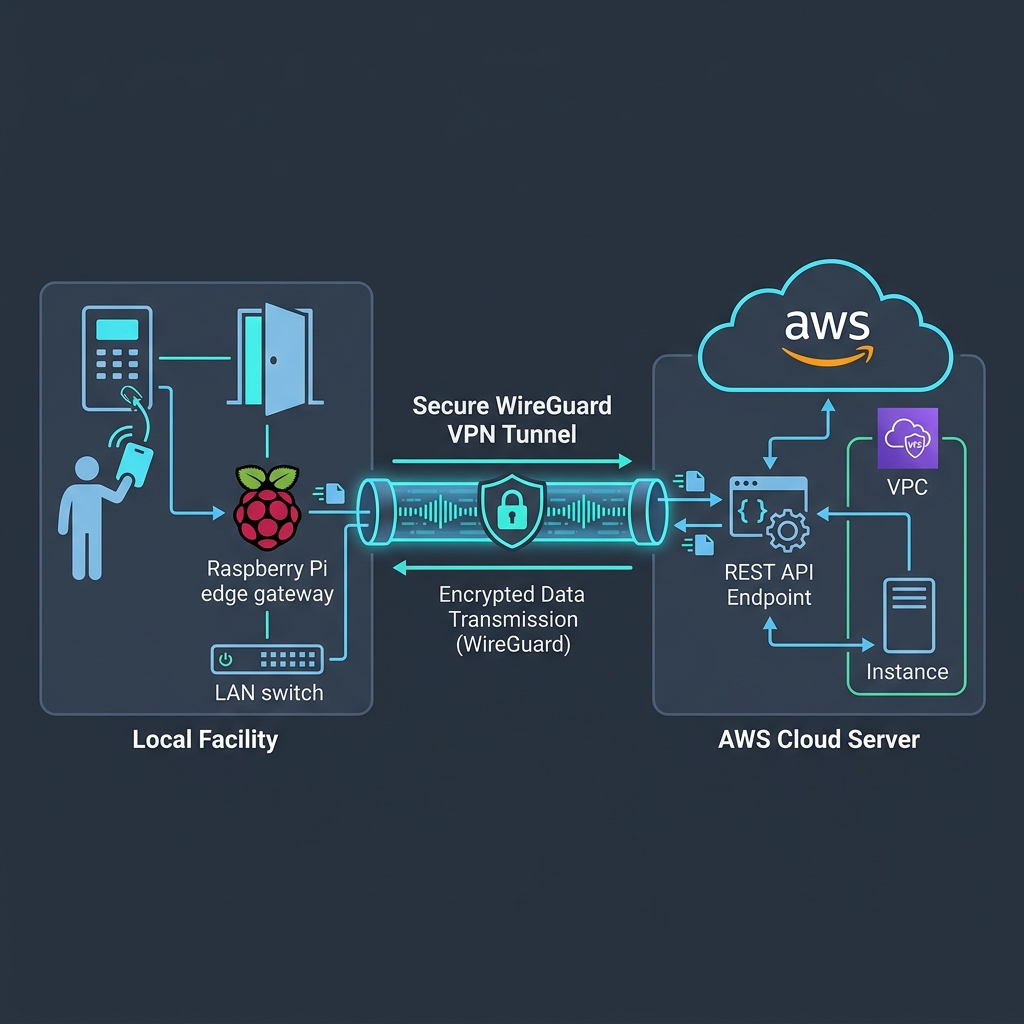
- Isolation: The ZKTeco panel is placed on a local VLAN without access to the internet.
- Edge Proxy: A local gateway (like a Raspberry Pi or lightweight Debian machine) sits on the same VLAN and communicates with the panel on the local network.
- Tunneling: The edge gateway maintains a persistent WireGuard VPN tunnel to the cloud VPC. All communications to the cloud API are routed securely through this tunnel.
Secure Networking: WireGuard Tunnel Setup
Below are the configuration files to establish the secure VPN tunnel between the cloud server and your edge gateway.
Cloud Server Configuration (/etc/wireguard/wg0.conf)
The cloud server acts as the VPN hub, accepting traffic from the gateway.
[Interface]
PrivateKey = [CLOUD_SERVER_PRIVATE_KEY]
Address = 10.0.0.1/24
ListenPort = 51820

# PostUp and PostDown commands for routing/firewall rules if necessary
PostUp = iptables -A FORWARD -i wg0 -j ACCEPT; iptables -t nat -A POSTROUTING -o eth0 -j MASQUERADE
PostDown = iptables -D FORWARD -i wg0 -j ACCEPT; iptables -t nat -D POSTROUTING -o eth0 -j MASQUERADE

[Peer]
PublicKey = [EDGE_GATEWAY_PUBLIC_KEY]
AllowedIPs = 10.0.0.2/32
Edge Gateway Configuration (/etc/wireguard/wg0.conf)
The edge gateway maintains a persistent link to the hub, sending keepalive packets to keep the NAT association open.
[Interface]
PrivateKey = [EDGE_GATEWAY_PRIVATE_KEY]
Address = 10.0.0.2/24

[Peer]
PublicKey = [CLOUD_SERVER_PUBLIC_KEY]
Endpoint = [CLOUD_PUBLIC_IP]:51820
AllowedIPs = 10.0.0.0/24
PersistentKeepalive = 25
Once WireGuard is running (wg-quick up wg0), the edge gateway can securely communicate with the cloud API at http://10.0.0.1/.
The Middleware: pyzkaccess Daemon with SQLite Local Caching
A simple event listener script will fail in production because WAN networks are unstable. If the edge gateway experiences a network dropout and tries to send an event directly to the cloud web server via a standard HTTP request, the request will timeout, and the card scan event will be lost.
To build a reliable system, we implement a Local Queue (SQLite) Pattern:
- When the ZKTeco panel triggers a card-swipe event, we write it immediately to a local SQLite database table.
- A background worker thread reads unsynced events from the database and attempts to POST them to the cloud web server.
- If the request succeeds, the record is marked as synced (or deleted). If the request fails (due to a WAN dropout), the event remains in the SQLite queue and will be retried automatically when connectivity returns.
Here is the complete, production-ready daemon script (gateway_daemon.py):
import os
import sys
import time
import sqlite3
import logging
import threading
import requests
from datetime import datetime
from pyzkaccess import ZKAccess

# --- Configurations ---
PANEL_IP = '192.168.10.10'
PANEL_PORT = 4370
CLOUD_API_URL = 'http://10.0.0.1/api/v1/access-events'
DB_PATH = 'local_event_queue.db'
API_TIMEOUT = 5  # seconds

# Configure Logging
logging.basicConfig(
    level=logging.INFO,
    format='%(asctime)s [%(levelname)s] %(message)s',
    handlers=[
        logging.StreamHandler(sys.stdout),
        logging.FileHandler('gateway.log')
    ]
)

# --- SQLite Setup ---
def init_database():
    """Initializes the local SQLite database for event buffering."""
    conn = sqlite3.connect(DB_PATH)
    cursor = conn.cursor()
    cursor.execute('''
        CREATE TABLE IF NOT EXISTS event_queue (
            id INTEGER PRIMARY KEY AUTOINCREMENT,
            card_number TEXT NOT NULL,
            door_id INTEGER NOT NULL,
            event_type INTEGER NOT NULL,
            timestamp TEXT NOT NULL,
            synced INTEGER DEFAULT 0
        )
    ''')
    conn.commit()
    conn.close()

def queue_event(card_number, door_id, event_type, timestamp):
    """Inserts a scan event into the SQLite queue."""
    try:
        conn = sqlite3.connect(DB_PATH)
        cursor = conn.cursor()
        cursor.execute('''
            INSERT INTO event_queue (card_number, door_id, event_type, timestamp)
            VALUES (?, ?, ?, ?)
        ''', (card_number, door_id, event_type, timestamp))
        conn.commit()
        conn.close()
        logging.info(f"Queued event: Card={card_number}, Door={door_id}")
    except Exception as e:
        logging.error(f"Failed to queue event in SQLite: {e}")

# --- Sync Worker Thread ---
def sync_worker():
    """Worker thread that polls the local SQLite database and pushes events to the cloud."""
    logging.info("Starting background synchronization worker...")
    while True:
        try:
            conn = sqlite3.connect(DB_PATH)
            cursor = conn.cursor()
            # Fetch the oldest unsynced events
            cursor.execute('SELECT id, card_number, door_id, event_type, timestamp FROM event_queue WHERE synced = 0 ORDER BY id ASC LIMIT 50')
            records = cursor.fetchall()
            conn.close()

            if not records:
                time.sleep(2)
                continue

            for record in records:
                db_id, card_number, door_id, event_type, timestamp = record
                payload = {
                    "card_number": card_number,
                    "door_id": door_id,
                    "event_type": event_type,
                    "timestamp": timestamp,
                    "gateway_id": "gateway-site-01"
                }

                # Try posting payload to the cloud REST API
                try:
                    response = requests.post(CLOUD_API_URL, json=payload, timeout=API_TIMEOUT)
                    if response.status_code in (200, 201):
                        # Mark record as synced on success
                        conn = sqlite3.connect(DB_PATH)
                        cursor = conn.cursor()
                        cursor.execute('UPDATE event_queue SET synced = 1 WHERE id = ?', (db_id,))
                        conn.commit()
                        conn.close()
                        logging.info(f"Successfully synced database ID {db_id} to the cloud.")
                    else:
                        logging.warning(f"Cloud server rejected event {db_id} with status {response.status_code}. Retrying...")
                        break  # Stop syncing loop to prevent congestion
                except requests.RequestException as req_err:
                    logging.warning(f"Connection to cloud API failed: {req_err}. Retrying in 5 seconds...")
                    break  # Pause syncing until network recovers

        except Exception as e:
            logging.error(f"Uncaught exception in sync worker loop: {e}")

        time.sleep(5)

# --- Real-Time Polling Daemon ---
def listen_to_panel():
    """Connects to the ZKTeco panel and polls real-time entry/exit logs."""
    init_database()

    # Spawn background sync thread
    syncer = threading.Thread(target=sync_worker, daemon=True)
    syncer.start()

    logging.info(f"Connecting to ZKTeco panel at {PANEL_IP}:{PANEL_PORT}...")

    while True:
        try:
            # Connect using the pyzkaccess wrapper
            with ZKAccess(PANEL_IP, PANEL_PORT) as panel:
                logging.info(f"Connected to panel! Device Serial: {panel.parameters.serial_number}")

                # Listen to event log buffer stream
                for event in panel.events.poll():
                    # ZKTeco event properties:
                    # event.card: Card number (int/str)
                    # event.door: Door index (usually 1, 2, 3, or 4)
                    # event.event_type: Integer ID for event types (e.g., normal verification, door closed)
                    if event.card:
                        timestamp_str = event.time.isoformat() if hasattr(event.time, 'isoformat') else str(event.time)
                        queue_event(
                            card_number=str(event.card),
                            door_id=int(event.door),
                            event_type=int(event.event_type),
                            timestamp=timestamp_str
                        )
        except Exception as err:
            logging.error(f"ZKTeco connection error or polling crash: {err}. Reconnecting in 10 seconds...")
            time.sleep(10)

if __name__ == '__main__':
    listen_to_panel()
Daemonizing the Middleware with Systemd
To run the Python script continuously and ensure it launches automatically when the Raspberry Pi boots, configure it as a Systemd Service.
Create a unit file in /etc/systemd/system/zkteco-gateway.service:
[Unit]
Description=ZKTeco to Cloud Gateway Daemon
After=network.target network-online.target [email protected]
Wants=network-online.target [email protected]

[Service]
Type=simple
User=pi
WorkingDirectory=/home/pi/zkteco-gateway
ExecStart=/home/pi/zkteco-gateway/venv/bin/python gateway_daemon.py
Restart=always
RestartSec=10
StandardOutput=syslog
StandardError=syslog
SyslogIdentifier=zkteco-gateway

[Install]
WantedBy=multi-user.target
Enable and start the service with:
sudo systemctl daemon-reload
sudo systemctl enable zkteco-gateway.service
sudo systemctl start zkteco-gateway.service
Use journalctl -u zkteco-gateway -f to monitor logs in real time.
Handling Real-World Quirks & Gotchas
1. The Socket Hang Problem
The ZKTeco Pull SDK uses a keep-alive connection, but it is notorious for silent deadlocks. If a network packet is dropped at a critical moment, the panel.events.poll() stream may freeze without raising an exception.
- Solution: In our daemon script, we configure a connection context that automatically recycles on timeout. If you experience lockups, implement an independent watchdog thread that performs a read query (such as
panel.parameters.serial_number) every 60 seconds and restarts the process if it fails.
2. SQLite Database Lockouts
If the sync worker thread writes to the SQLite database at the exact moment the main event polling thread is executing a transaction, you may see database lock errors (database is locked).
- Solution: In python sqlite3, use a robust connection context and set a high timeout (e.g.,
sqlite3.connect(DB_PATH, timeout=20.0)). SQLite handles concurrent reads, but sequentializes writes.
3. Edge Hardware Memory Corruption
Raspberry Pis running off SD cards are vulnerable to corruption during sudden power losses.
- Solution: Configure your Raspberry Pi OS with a read-only root system using
raspi-config(OverlayFS), and write the SQLite event queue to an external USB storage drive or mount a small RAM disk (tmpfs) specifically for/home/pi/zkteco-gateway/local_event_queue.dbif the sync delay requirements permit volatileness.
Pros and Cons of the Hybrid Edge Approach
Modernizing ZKTeco integration via a localized edge proxy instead of traditional setups has distinct trade-offs:
| Parameter | Pros | Cons |
|---|---|---|
| Cost Savings | Zero licensing fees for expensive proprietary SaaS applications. Exclusively uses existing hardware. | Engineering hours are required to build, test, and manage the custom middleware. |
| Data Integrity | Local SQLite buffering ensures events are never lost, even during long internet outages. | If the edge gateway’s memory/disk fails, events won’t reach the cloud. |
| Security | Panels are completely air-gapped on a private VLAN. Traffic to the cloud is encrypted through a WireGuard tunnel. | Must manage the OS security updates on the edge gateways (e.g. Raspberry Pi OS patching). |
| Customizability | You can process events locally in milliseconds (e.g., trigger emergency bells or send instant local alerts). | Requires Python expertise and familiarity with ctypes binding behavior. |
Conclusion
Migrating physical access control panels to a cloud-based web server doesn’t require ripping out functional legacy hardware. By implementing an Edge-to-Cloud architecture with an isolated local VLAN, an encrypted WireGuard VPN, and a robust python proxy with SQLite transaction buffering, you can transform legacy ZKTeco C3-series controllers into modern, event-driven infrastructure.
This pattern is highly reliable, highly secure, and gives you total control over user databases and entry authorization loops.